

Start a home repair log that captures date, item or system, action taken, cost, contractor, warranty expiry, and a photo. That single entry protects your warranties, your budget, and your resale value the day you write it.
You don’t need software or a filing system to begin. You need seven fields and one habit. Here’s the minimum you should capture on your very first entry:
- Date: when the work happened
- Item/system: water heater, roof, furnace, dishwasher
- Action: what was actually done (“replaced igniter,” “patched flashing”)
- Cost: total, including parts and labor
- Contractor: name and phone number, or “DIY”
- Warranty expiry: the exact date, not “a year from now”
- Photo: before or after, whatever you have
A phone notes app is the lowest-friction option, since it’s already open and searchable. A printable sheet works if you like paper. A spreadsheet wins once you have more than a dozen entries and want totals. Pick one and write this line right now: “[Today’s date] — Water heater — flushed tank — $0 — DIY — no warranty — [photo].”
Key Takeaways
A home repair log works because it turns scattered receipts and memory into verifiable records that protect warranties, support resale value, and reveal your real maintenance spending.
| Point | Details |
|---|---|
| Capture seven core fields | Date, system, action, cost, contractor, warranty expiry, and a photo cover most claims and resale questions. |
| Tag repairs vs. improvements | Improvements adjust cost basis for taxes at sale; routine repairs generally do not. |
| Choose the fastest format | Voice dictation into a notes app can cut entry time to about 20 seconds per record. |
| Budget against real numbers | Bankrate estimates an $8,808 average annual maintenance budget nationwide. |
| Automate the follow-up | Workbenchguide pairs logged repairs with reminders and contractor Q&A so warranty windows and service dates don’t slip. |
Table of Contents
- Home Repair Log Fields: What to Track and Why It Matters
- Templates and Quick-Start Tools for Logging Repairs
- How to Build a Habit Around Your Maintenance Tracker
- Why Home Maintenance Records Actually Pay Off
- WorkbenchGuide Resources for Tracking Home Repairs
- Editorial Perspective: The Habit Beats the Format
- Let WorkbenchGuide Run the Reminders for You
- Sources
Home Repair Log Fields: What to Track and Why It Matters
A repair log only pays off if it captures the right details, not just any details. Skip a field today and you’ll be guessing at it during a warranty dispute or a home sale five years from now.
Here’s what each field actually protects and a sample entry showing it in practice.
| Field | Why it matters | Example |
|---|---|---|
| Date | Establishes service timeline for warranty and resale claims | March 3 |
| System/location | Lets you filter by system when planning replacements | Furnace, basement mechanical room |
| Action taken | Documents scope for future contractors and insurance | Replaced igniter and flame sensor |
| Cost (labor + materials) | Builds your real maintenance budget over time | $340 total |
| Contractor + license | Gives you a record for callbacks and complaints | Ace Heating & Air |
| Invoice/reference number | Backs up cost claims for taxes or insurance | Invoice |
| Model/serial number | The first thing manufacturers ask for on a claim | Carrier model, serial number |
| Warranty expiry | Prevents missed claim windows | Expires August |
| Photos | Visual proof of condition and installation | Photo of nameplate and finished repair |
| Next scheduled action | Turns the log into a planning tool, not just a diary | Inspect igniter again in 12 months |
Manufacturers and insurers almost always ask for the model and serial number first, and homeowners routinely fail to have them on hand because that detail lives on a sticker inside the unit, not in memory. Recording it once when the technician is standing there saves you a crawl into the attic later.
You also need to tag each entry as a repair or an improvement. A repair restores something to working order (fixing a leaking pipe). An improvement adds value or extends life (replacing that pipe network entirely, or adding central air where there was none). The distinction matters because improvements adjust your home’s cost basis for capital gains purposes when you sell, while routine repairs generally do not. Your accountant will thank you for keeping the two separate instead of untangling five years of receipts at closing.
Pro Tip: If you’re short on time, the five-field minimum viable record is date, system, action, cost, and contractor. Add warranty expiry, model/serial, and photos when the job is significant, like an HVAC replacement or roof work, where verifiable documentation matters most.
Templates and Quick-Start Tools for Logging Repairs
You don’t need to build a system from scratch. Three formats cover almost every homeowner’s needs, and each one works from day one.
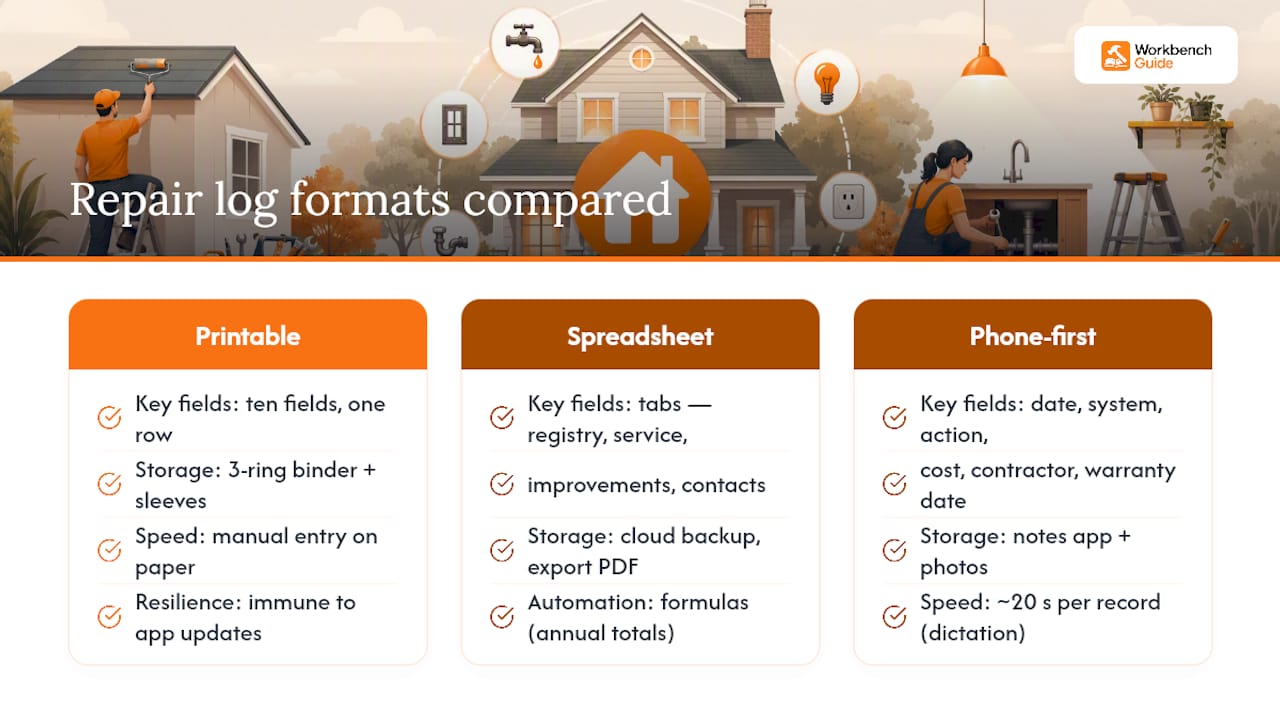
1. Printable sheet. A single page with the ten fields above, one row per repair, kept in a three-ring binder next to a plastic sleeve for receipts and photo printouts. Binders still work because they’re immune to app updates, subscription lapses, and dead batteries. Store one sheet per system or one running log for the whole house, whichever matches how you think.
2. Spreadsheet with tabs. Set up four tabs: a system registry (every appliance and its install date), a service log (every repair or maintenance visit), an improvements tab (anything that adds resale value), and a contacts tab (every contractor you’ve used). A simple SUMIF formula totals annual repair cost by system, and a filter on the improvements tab isolates capital expenses for tax season. Back the file up to cloud storage or export a PDF copy twice a year.
3. Phone-first capture. Open your notes app, snap a photo, and dictate a fixed format: “date, system, action, cost, contractor, warranty date.” Voice dictation into a structured note can cut entry time to roughly 20 seconds per record, compared to a minute or more of typing. The key is naming the warranty date explicitly in the dictation so it’s searchable later, not buried in a sentence.
A dedicated app makes sense once you’re managing multiple properties or want automatic reminders tied to service intervals. The trade-off is vendor lock in and it depends on the app: you gain automation but you’re trusting a third party to keep your data portable. Many homeowners land on a hybrid: a spreadsheet plus scanned receipts for the record, with periodic app-based audits for reminders.
How to Build a Habit Around Your Maintenance Tracker
The best home maintenance log is the one you actually update. Here’s a five-step workflow you can run from your phone in under two minutes:
- Photo first. Take the picture before you do anything else, even before the invoice is in hand.
- One-line action. Write what was done in plain language, no jargon.
- Cost. Enter the number while the invoice is still in your pocket.
- Contractor. Name and phone number, copied straight from the invoice.
- Set the next date. A reminder for the next service or the warranty expiry, whichever comes first.
Three rules keep this from falling apart after month one. Log the receipt within 24 hours, before it disappears into a junk drawer. Default to photo-first even when you’re not sure the photo matters, since deleting later is easy but recreating a “before” shot is not. And tie your review to a seasonal trigger, spring and fall, matched to when you’re already doing seasonal maintenance walkthroughs anyway.
Capture speed decides whether the habit survives. A notes app entry runs 20 to 90 seconds. A spreadsheet entry runs 60 to 120 seconds once the file is open. A dedicated app with saved fields runs 45 to 75 seconds. Pro Tip: Save a note template with the field labels pre-typed so you’re filling blanks, not writing from scratch every time.

Why Home Maintenance Records Actually Pay Off
A repair log isn’t paperwork for its own sake. It’s the difference between winning a warranty claim in five minutes and arguing with a manufacturer’s call center for a week over a serial number you can’t locate. It’s also the difference between a buyer trusting your $9,000 roof quote and a buyer discounting your asking price because nothing on the house is documented.
Home inspectors say maintenance records reduce uncertainty and directly improve inspection accuracy, which matters at resale more than most sellers realize.
Bankrate’s 2025 research puts the average national maintenance budget at $8,808 a year, with total hidden homeownership costs, including maintenance, running $21,400 annually nationwide.
That’s real money moving through your house every year, and a log is how you know whether you’re actually spending near that number or getting blindsided by it. Prioritize logging these four systems first, since they carry the highest replacement cost and the tightest warranty windows: HVAC, roofing, water heater, and electrical panel work.
WorkbenchGuide Resources for Tracking Home Repairs
Workbenchguide builds the checklists and reminder systems that turn the workflow above into something you don’t have to think about twice.
- Home maintenance checklists organized by season and system
- Step-by-step DIY guides for common repairs, so your log entries match real repair steps
- Photo notes and task tracking that mirror the quick-entry fields covered above
- Contractor Q&A access for verifying scope and cost before you log a big-ticket repair
A repair log is only as useful as the reminders that get you back to it. Pairing the fields you track with a scheduled nudge is what separates a log people update for a month from one they update for a decade.
Contributor Sean covers practical home maintenance workflows for Workbenchguide, including checklist design and DIY repair sequencing.
Editorial Perspective: The Habit Beats the Format
Most advice on this topic obsesses over which app or spreadsheet template is “best.” That’s backward. The research actually points somewhere else: capture speed is what determines whether a log survives past month two, not which columns it has.
I’d argue the conventional wisdom oversells structure and undersells friction. A gorgeous 12-tab spreadsheet that takes two minutes to open and populate will get abandoned by July. A phone note with a dictated one-liner and a photo, entered in 20 seconds while the invoice is still warm from the printer, will still be running next winter. If you’re choosing where to spend your effort, spend it on making entry fast, not on making the template comprehensive.
Where readers should start: pick the photo-first, voice-dictated method for everyday repairs, and reserve the full spreadsheet fields (model, serial, license number) for the handful of big-ticket systems, HVAC, roof, water heater, where warranty claims actually hinge on that detail. Perfect records for everything are a good way to end up with records for nothing.
— Sean
Let WorkbenchGuide Run the Reminders for You
A notebook or spreadsheet handles the record. It won’t tell you when the water heater warranty is about to lapse or nudge you before the HVAC filter is overdue again. That’s the gap Workbenchguide closes: it pairs the exact fields covered in this guide, cost, contractor, warranty date, photos, with reminders that fire automatically, so nothing depends on you remembering to check a spreadsheet tab.
It suits homeowners who like the discipline of a repair log but don’t want to be the one enforcing it every season, plus landlords and property managers juggling more than one address. Start with the home maintenance checklist to set up your first system entries and reminder schedule today.
Leave a Reply