
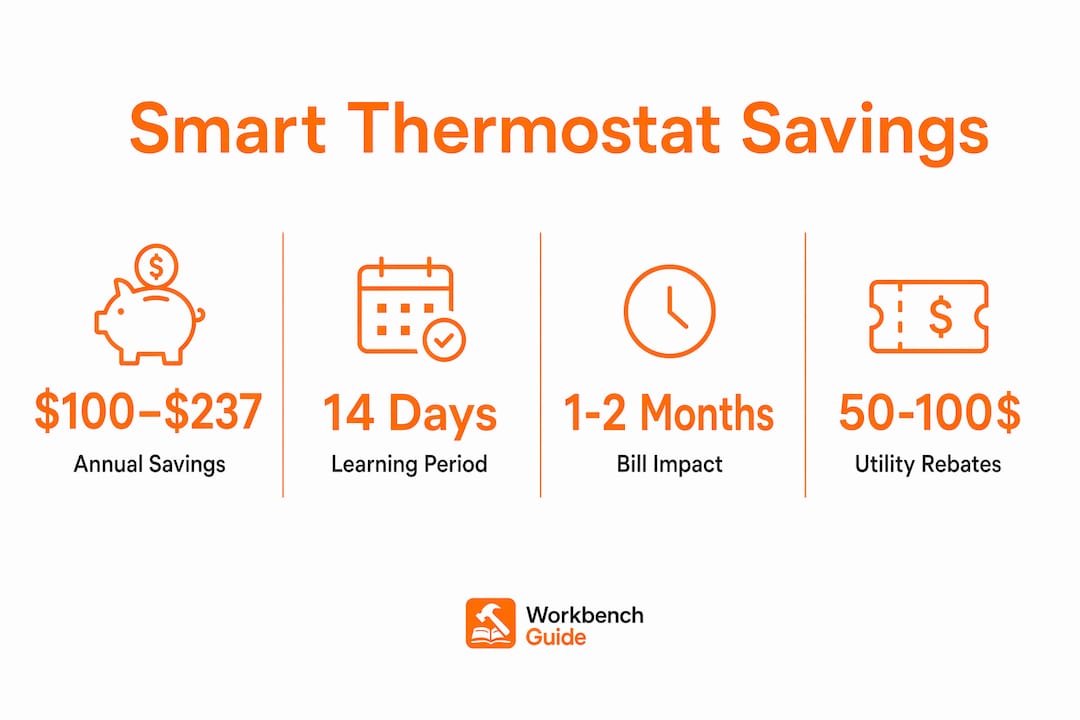
A smart thermostat is a Wi-Fi-enabled device that learns your schedule, senses occupancy, and adjusts your home’s temperature automatically to reduce energy waste and lower utility bills. Unlike traditional programmable thermostats, which require manual scheduling that up to 40% of owners never bother to set, smart thermostats handle optimization on their own. ENERGY STAR-certified models reduce heating and cooling costs by 8%–15% annually, translating to $100–$237 in savings per household each year. The US Department of Energy and the EPA both recognize smart thermostats as one of the most accessible upgrades for residential energy efficiency. Understanding why use smart thermostats starts with recognizing that the device does the work your old thermostat required you to do manually.
Why use smart thermostats to save energy and money
The core mechanism behind smart thermostat energy savings is automation. The device tracks when you leave, when you return, and how your home heats and cools, then builds a schedule that reduces energy use without sacrificing comfort. That is fundamentally different from a programmable thermostat, which runs the same fixed schedule whether you are home or on vacation.
How occupancy sensing and geofencing cut waste
Geofencing uses your phone’s location to detect when you leave home and automatically shifts the thermostat to an energy-saving mode. Occupancy sensors do the same thing passively, without requiring your phone. Both approaches solve the same problem: heating or cooling an empty house is pure waste. Smart thermostats eliminate that waste without requiring you to remember to adjust anything.

Adaptive recovery: the feature most homeowners overlook
Adaptive recovery is one of the most underappreciated smart thermostat features. Instead of running your HVAC system at full power until it reaches the target temperature, adaptive recovery calculates exactly when to start heating or cooling so the home reaches the right temperature at the right time. The result is less runtime, lower peak energy draw, and a more consistent indoor climate.
Time-of-use pricing: an extra layer of savings
Many utility companies charge more for electricity during peak hours, typically late afternoon and early evening. Smart thermostats with time-of-use (TOU) optimization pre-cool or pre-heat your home during cheaper off-peak hours, then coast through the expensive window. TOU optimization can add $200–$300 in annual savings on top of the baseline efficiency gains.
The payback period for most smart thermostats runs 12–24 months. Utility rebates, which many providers offer for ENERGY STAR-certified devices, can cut that window to under a year. The upfront cost of $100–$200 becomes a straightforward financial decision when the math is laid out clearly.
Pro Tip: Check your utility company’s website before buying. Many offer $50–$100 rebates on ENERGY STAR smart thermostats, which changes the payback calculation significantly.
How smart thermostats work with home automation
Smart thermostats deliver their biggest advantages when connected to a broader home automation system. A standalone smart thermostat is useful. One integrated with smart lighting, security sensors, and door locks becomes something closer to a home management system.
Integration with a home automation ecosystem transforms the thermostat from a standalone device into the home’s ‘brain,’ enabling complex, energy-saving routines that no single device could execute alone.
When your home automation system detects that your security system has been armed in “Away” mode, it can simultaneously trigger the thermostat to shift to an energy-saving setback. If a window sensor detects an open window, the system can pause heating or cooling automatically. These coordinated routines eliminate the energy waste that happens when devices operate independently.
Practical integration benefits include:
- Voice control via Amazon Alexa, Google Assistant, or Apple HomeKit for hands-free temperature adjustments
- Automated “Away” mode triggered by your security system or door lock, not just your phone’s GPS
- Window and door sensors that pause HVAC when airflow is detected, preventing conditioned air from escaping
- Smart lighting coordination that signals occupancy to the thermostat, improving room-level accuracy
Remote room sensors extend this further by detecting temperature and occupancy in specific rooms. The thermostat then prioritizes conditioning the rooms people actually use, rather than treating the whole house as a single zone. This pairs naturally with HVAC zoning principles that reduce energy waste in unoccupied spaces.
Privacy is a real consideration with integrated systems. Any device connected to a home automation hub collects behavioral data. Review the privacy settings on your thermostat app and automation controller, and use a dedicated home network for smart devices where possible.
Installation and setup: what you need to get it right
A smart thermostat installed but never properly configured delivers a fraction of its potential savings. Most homeowners plug it in, set a basic schedule, and stop there. That approach misses the features that generate the most value.
Check for a C-wire before you buy
A continuous power source, known as a C-wire, is often required for smart thermostats to maintain Wi-Fi connectivity and run sensors reliably. Without a C-wire, the device may lose connectivity or drain power from other HVAC components. Older homes frequently lack a C-wire, which means you will need either an adapter kit or a professional installation. Check your existing thermostat wiring before purchasing any model.
For guidance on professional thermostat upgrades, a licensed HVAC technician can assess your wiring and recommend the right installation path.
The setup steps that actually matter
After installation, the configuration phase determines how much you save. The steps most homeowners skip are the ones with the highest impact:
- Enable geofencing in the thermostat app and grant location permissions to all household members’ phones
- Activate TOU rate schedules if your utility offers time-of-use pricing
- Add remote room sensors to prioritize the rooms your household uses most
- Set your occupancy preferences so the device knows your typical wake, leave, and return times
- Connect to your home automation hub if you have one, to enable coordinated routines
Allow 14 days without overriding the thermostat’s automatic schedule. The AI learning engine needs that window to observe your patterns and build an accurate predictive schedule. Constant manual overrides reset the learning process and reduce accuracy.
Pro Tip: Treat the first two weeks after installation as a calibration period. Resist the urge to adjust the temperature manually. The device learns faster when you let it run.
What homeowners and renters can realistically expect
Smart thermostat savings vary based on your climate, home size, utility rates, and existing habits. Setting realistic expectations prevents disappointment and helps you identify whether your device is performing as it should.
Homes with irregular schedules or poor thermostat discipline see the largest savings. If you currently leave your heat running all day while you are at work, a smart thermostat will produce dramatic reductions. If you already follow a strict manual schedule, the incremental gains are smaller, but you still benefit from adaptive recovery, TOU optimization, and reduced HVAC wear.
The table below summarizes what different homeowner profiles can realistically expect:
| Homeowner profile | Expected annual savings | Primary benefit |
|---|---|---|
| Irregular schedule, no current programming | $150–$237 | Automated setbacks eliminate daily waste |
| Consistent manual schedule, disciplined | $50–$100 | Adaptive recovery and TOU optimization |
| Renter with variable occupancy | $80–$150 | Geofencing and occupancy sensing |
| Integrated smart home system | $200+ | Coordinated routines across devices |
Beyond bill savings, smart thermostats reduce HVAC runtime. Less runtime means less wear on compressors, heat exchangers, and fan motors. That translates to fewer repairs and a longer equipment lifespan. Pair smart thermostat use with regular HVAC servicing to get the most out of both investments.
Smart thermostats also support better air quality. Shorter, more precise HVAC cycles reduce humidity fluctuations and limit the conditions that promote mold growth. For households with allergy sufferers, that is a benefit worth factoring into the decision.
Key Takeaways
Smart thermostats deliver the most value when fully configured with geofencing, TOU scheduling, and room sensors, not simply installed and left on default settings.
| Point | Details |
|---|---|
| Energy savings are real but variable | ENERGY STAR models save $100–$237 annually, depending on climate and habits. |
| Payback period is short | Most devices pay for themselves within 12–24 months, faster with utility rebates. |
| Setup determines performance | Enabling geofencing, TOU rates, and room sensors unlocks the majority of savings. |
| Integration multiplies benefits | Connecting to a home automation system enables coordinated routines that no single device can match. |
| Irregular schedules benefit most | Homeowners with poor thermostat discipline see the largest and fastest savings. |
The upgrade that rewards patience
I have installed smart thermostats in two homes, and the honest truth is that the first month felt underwhelming. The device was running, the app looked good, and my bills barely moved. The problem was that I had not enabled geofencing, had not connected the room sensors, and had not checked whether my utility offered TOU rates. Once I did all three, the savings became real and consistent.
The mistake I see most often is treating a smart thermostat like a fancy remote control. Homeowners install it, use the app to adjust temperature from the couch, and call it done. That captures maybe 20% of the device’s potential. The real value is in the automation features that run without you touching anything.
My advice: spend 30 minutes on setup the day you install it. Read through every setting in the app. Connect it to your home automation system if you have one. Enable every sensor. Then leave it alone for two weeks. The AI learning process needs uninterrupted data to build an accurate model of your household.
Smart thermostats are also one of the few home upgrades that pay for themselves and keep paying. A new faucet looks better but does not reduce your bills. A smart thermostat does both. For renters, many landlords will approve the swap since the device is removable and the savings benefit everyone. It is one of the most accessible home energy improvements available at any budget level.
— Sean
Workbenchguide resources to support your home efficiency goals
A smart thermostat works best as part of a well-maintained home. Dirty filters, leaky ducts, and neglected HVAC systems undercut the savings even the best thermostat can deliver. Workbenchguide provides step-by-step DIY maintenance guides and seasonal checklists that help you keep your HVAC system running at full efficiency year-round. The home maintenance checklist covers every system in your house, including HVAC tasks timed to protect your equipment and maximize the value of your smart thermostat investment. Staying on top of routine maintenance is the simplest way to make sure your energy-saving upgrades actually deliver.
FAQ
What does a smart thermostat actually do differently?
A smart thermostat learns your schedule, uses occupancy sensing and geofencing to avoid conditioning empty spaces, and applies adaptive recovery to minimize HVAC runtime. Traditional programmable thermostats run a fixed schedule regardless of whether anyone is home.
How much can a smart thermostat save per year?
ENERGY STAR-certified smart thermostats save $100–$237 annually on heating and cooling costs. Savings vary based on climate, home size, and how fully you configure the device’s automation features.
Do smart thermostats work for renters?
Yes. Most smart thermostats are removable, so renters can take them when they move. Check with your landlord before installation, as many approve the swap since the device benefits both parties through lower utility costs.
How long does it take to see savings?
Most homeowners notice bill reductions within the first 1–2 billing cycles after full setup. The 14-day learning period is when the device builds its most accurate schedule, so savings typically improve after that window.
Is professional installation necessary?
Professional installation is recommended if your home lacks a C-wire, since adding one requires working inside your HVAC system’s wiring. Homes with a C-wire already in place can typically handle DIY installation in under an hour.