
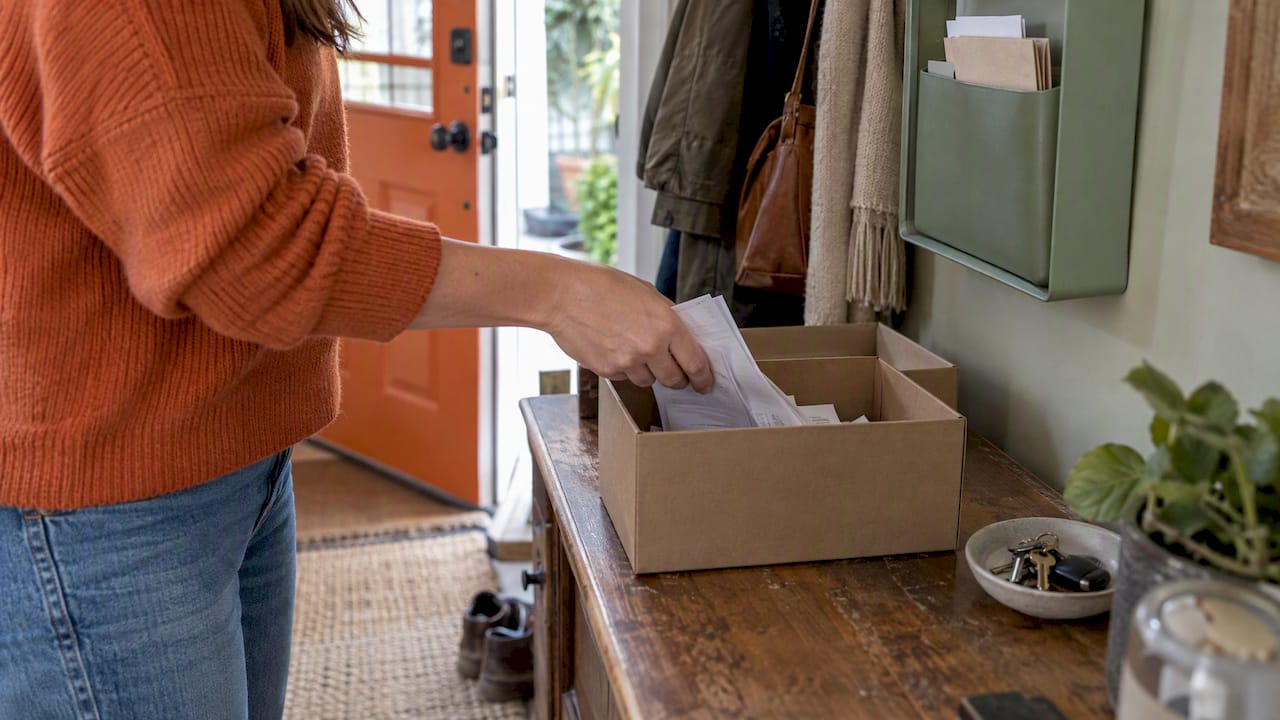
The simplest way to organize home receipts is to give them one home, sort them by purpose once a week, and keep a searchable digital copy of anything you might need later: tax records, home improvements, warranties and repairs. Everything else can be tossed after you have recorded it. This guide walks through a paper setup, a phone-based digital setup, and how long to hold on to each kind of receipt.
TL;DR
- Start with one container or envelope for every receipt, then sort it weekly by purpose: tax, home projects, warranties and returns, and discard.
- Scan the receipts that matter (home improvements, big appliances, repairs) and name each file with the date, store and purpose. Keep the paper until the scan is safely backed up.
- Keep tax-support records at least until the return’s limitation period ends, which is generally 3 years from filing. Keep home improvement records for as long as you own the house, plus the tax window after you sell.
- Do a short annual purge: shred routine receipts you have already recorded and move important ones to permanent storage.
Table of Contents
- Why home receipts pile up (and which ones matter)
- Set up a simple paper system first
- Go digital: scan, name, back up
- How long to keep household receipts
- What about the IRS $75 receipt rule?
- Perspective: receipts are home history, not just tax paperwork
- A 30-minute setup plan
- Where a maintenance app fits
- Common mistakes to avoid
- FAQ
- Sources
Why home receipts pile up (and which ones matter)
Most households do not have a receipt problem. They have a sorting problem. Grocery slips, a hardware store run, a plumber’s invoice and a dishwasher warranty all land in the same drawer, and six months later you cannot find the one that matters.
The fix is to stop treating all receipts as equal. Some are worth about a week of your attention. A few are worth keeping for a decade. Here is a quick way to tell them apart:
| Receipt type | Examples | Why it matters | Typical handling |
|---|---|---|---|
| Everyday spending | Groceries, gas, takeout | Budget tracking only | Record it, then discard |
| Tax-related | Home office expenses, charitable donations, mortgage and property tax paperwork | Supports a deduction or credit | Keep until the limitation period passes |
| Home improvements | New roof, kitchen remodel, HVAC replacement, deck | Can raise your home’s tax basis when you sell | Keep for as long as you own the home |
| Warranty and returns | Appliances, tools, electronics | Proves purchase date and price | Keep through the warranty or return window |
| Repairs and service | Plumber, electrician, gutter cleaning | Shows maintenance history and supports claims | Keep with the system it relates to |
If you only have energy for one category, make it home improvements and warranties. Those are the receipts people most often wish they had.
Set up a simple paper system first
You do not need a filing cabinet to start. The Consumer Financial Protection Bureau’s spending tracker suggests beginning with a small container or envelope: put every receipt in it, write the purchase on any receipt that lacks detail, and jot down cash purchases that came without a slip. It also suggests reviewing receipts weekly by category, and trying a shorter window, such as one or two weeks, if a full month feels like too much.
That is the whole foundation. Here is how to build on it.
Step 1: Pick one landing spot
Use a shoebox, a small file box or a wall pocket near where you drop your keys. The point is that every receipt has exactly one place to go. Receipts in coat pockets, car cup holders and purses are the ones that disappear.
Step 2: Sort by purpose, not by date
Wirecutter’s guide to organizing important documents recommends sorting household papers into functional piles: actionable, household, recycle, shred, project and archive. For receipts, a version of that works well:
- Act on it: returns you still plan to make, reimbursements you are owed.
- Household and tax: anything that supports a deduction or a budget category.
- Warranty: appliances, tools, anything with a guarantee.
- Projects: materials and labor for a repair or renovation.
- Discard or shred: routine receipts you have already recorded.
Shred anything showing a full account number, a name with an address, or other personal details.
Step 3: Use labeled folders
Wirecutter’s advice is to use clearly named folders, binders or hanging files in an accessible, secure location. A small accordion file with five or six pockets is plenty for most households. Labels that work for homeowners:
- Taxes (current year)
- Home improvements
- Appliances and warranties
- Repairs and service
- Insurance
- To return
Keep a “current” file for the year’s receipts and paid bills. Virginia Cooperative Extension’s household records guidance describes the same pattern: a temporary current-records location, then an annual purge in which routine receipts already recorded are discarded and important records move into permanent files. Its broader point is worth remembering: there is no single correct filing system, and the best one is the one your household will actually maintain.
Step 4: Write on the receipt
Thermal paper fades, and a slip that says only the store name will not help you in two years. The CFPB recommends writing the purchase description directly on a receipt that lacks detail. For home projects, add the room or the system: “upstairs bath, new shutoff valves” or “water heater, anode rod.” It takes ten seconds and saves you from guessing later.
Step 5: Protect the keepers
Important originals, such as deeds and titles, deserve better than a shoebox. New Mexico State University Extension notes that a bank safe-deposit box is the preferred place for key records like car titles, with a fireproof home safe as another option. Everyday receipts do not need that level of protection, but a scanned backup of the important ones does.
Go digital: scan, name, back up
Paper works until you need to find something. A digital copy of the receipts that matter makes them searchable and protects them from fire, flood and fading ink.
Scan them as searchable files
Adobe’s guide to digitizing receipts recommends saving scans as searchable PDFs, organizing them in folders and keeping copies in at least two locations. The same page says digital receipts are acceptable for tax purposes as long as they are legible and clearly show the amount, date, vendor and purpose of the expense.
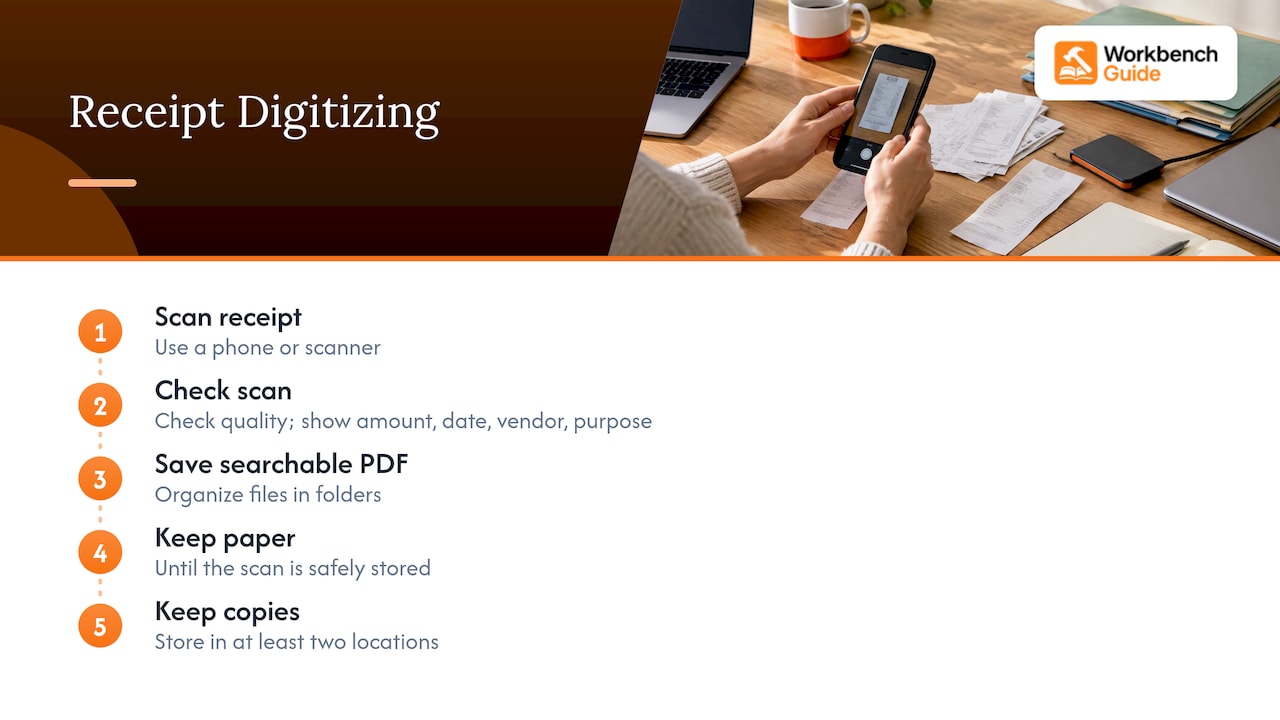
PayPal’s receipt management guide adds practical habits: scan with a phone or scanner, check the image quality, and keep the paper until the scan is safely stored.
Scanning on an iPhone
You already have a scanner in your pocket. According to Apple Support, you can do either of these:
- In Notes: tap the Attachment button, then Scan Documents.
- In Files: tap More, then Scan Documents.
Hold the phone over the receipt, let it capture, tap Done, and in Files choose a location and tap Save. Put the receipt on a dark, flat surface with good light, and check that the date and total are readable before you recycle the paper.
Name files so you can find them
PayPal recommends descriptive filenames with the purchase date, retailer and purpose. For a homeowner, a good pattern is:
2026-03-14_HomeDepot_water-heater_warranty.pdf
Use year-month-day first so files sort in order. Then keep the same naming and folder structure every time. Consistency matters more than which pattern you choose.
Build a folder structure that matches your paper one
PayPal also suggests organizing digital receipts by category and by year, with tags if your tool supports them. A structure that mirrors your paper folders keeps things simple:
- Home Records
- 2026
- Taxes
- Improvements
- Appliances and warranties
- Repairs and service
- 2026
A CPA quoted by FreshBooks, Jason Ding, suggests that moving to an electronic system is often the most efficient way to cut down on manual paper chases and keep receipts secure for long-term tax compliance. That fits what most people find: the first scan is a chore, but retrieval gets much faster.
The two-location rule
A scan stored only on your phone is one dropped phone away from gone. Save each file in two places, for example your phone’s cloud storage and an external drive or a second cloud account. Do the backup the same day as the scan, then recycle or shred the paper if it is a routine receipt. For big-ticket items, many people keep the paper too.
How long to keep household receipts
This is the question that drives most people’s anxiety, so here is the plain version.
Tax records
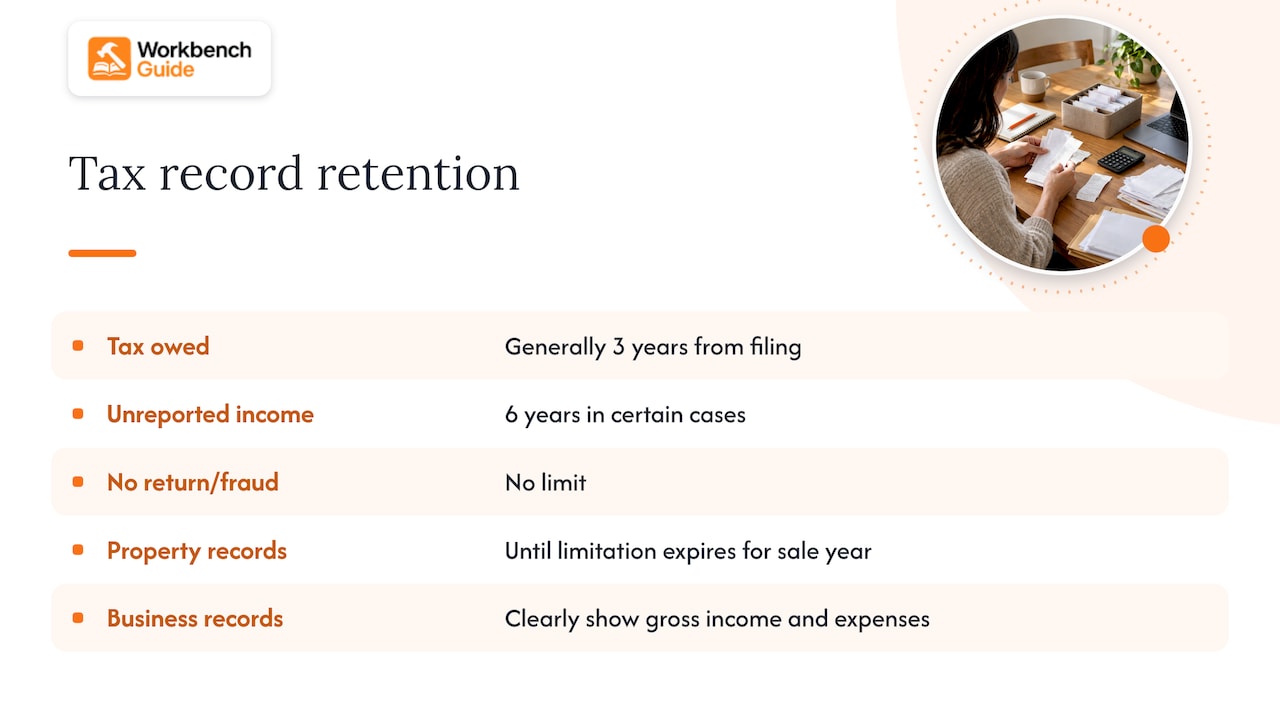
The IRS says in Topic no. 305 that you should keep records supporting an item of income, a deduction or a credit for as long as they may matter in administering the tax code. In practice, that generally means until the period of limitations for that return runs out. For assessing tax you owe, that is generally 3 years from the date you filed. The page also describes longer periods: 6 years in certain cases of significantly unreported income, and no limit if no return was filed or a return was fraudulent. Property records should be kept until the limitation period expires for the year you sell or otherwise dispose of the property.
If you run a business or work from home as self-employed, note that the IRS does not require a specific bookkeeping method as long as your records clearly and accurately show gross income and expenses. Ask a CPA or enrolled agent about your own situation, especially if you claim a home office deduction.
Home improvement receipts
This is the category people forget. The money you spend on qualifying improvements can raise your home’s tax basis, which can reduce the gain you report when you sell. Nolo’s overview of home improvement records explains why detailed records of your purchase and each improvement matter for proving that basis. Because the sale could be years or decades away, keep these receipts for as long as you own the home, and then through the tax window that follows the sale. A tax professional can tell you which of your projects count as improvements and which are routine repairs.
Warranties, returns and insurance
These follow their own clocks, not the IRS’s. Keep a receipt until the return window closes, or through the end of the warranty plus a little margin. For insurance, receipts for expensive items and renovations help document what you own and what you added. Photos help here too; our guide to home project photos shows how to capture a room so the record holds up later.
When a contractor gives you a workmanship warranty, file the invoice and the warranty paperwork together. Knowing what to look for in a masonry workmanship warranty is a good example of why: the terms, exclusions and claim steps only help you if you can produce the paperwork.
Quick reference
| Receipt | Suggested keep time |
|---|---|
| Groceries, takeout, routine spending | Until recorded in your budget, then discard |
| Tax deduction or credit support | At least until the limitation period passes, generally 3 years from filing |
| Home improvements | As long as you own the home, then through the tax period after the sale |
| Appliance and tool warranties | Through the warranty period |
| Returns | Until the return window closes |
| Contractor invoices and warranties | For the life of the warranty, and longer for major work |
What about the IRS $75 receipt rule?
This rule comes up often, and it is easy to misread. The IRS ruling behind it, Release 200417022, concerns business travel and entertainment reimbursements. It requires paper receipts for lodging of any amount and for non-card expenses over $75. It is not a rule about everyday household receipts, so you do not need to save every slip over $75 for your home budget. If you travel for work and are reimbursed, ask your employer or tax preparer how it applies to you.
Perspective: receipts are home history, not just tax paperwork
We build a home maintenance app, so we see the same pattern again and again. People file receipts to survive tax season, and then lose the information that would have been most useful: when the water heater was installed, who flushed the system last, what brand of paint is in the hallway.
Our view is that a receipt is a record about a part of your house. The receipt for a new furnace belongs next to the filter size, the install date and the service reminders for that furnace, not in a pile with the grocery slips. When records are organized by system and by property, you stop hunting through folders and start answering questions: is this still under warranty, when was this last serviced, what did we spend on the roof?
That is why we pair receipts with photos and short notes. A scanned invoice tells you what you paid. A photo of the work and a one-line note tell you what was done. If you want a lightweight way to build the habit, our two-minute monthly routine is built for exactly that.
One caution from our experience: do not try to build the perfect system on day one. Start with the big-ticket items, the ones that would cost you the most if you could not prove them, and work outward.
— Sean
A 30-minute setup plan
If you want to get this done today, here is a plan that fits in a single sitting.
- Minutes 0 to 5: Choose your container and label six folders or envelopes.
- Minutes 5 to 15: Gather the receipts from drawers, bags and the car. Sort them into the five purpose piles. Shred the discard pile.
- Minutes 15 to 25: Scan every receipt in the home improvements and warranty piles. Name each file with the date, store and purpose.
- Minutes 25 to 30: Back up the folder to a second location and put a recurring weekly reminder on your calendar for a five-minute sort.
Then keep two habits going. Once a week, empty the landing spot into folders. Once a year, ideally when you gather tax paperwork, purge routine receipts and move important records to permanent storage.
Where a maintenance app fits
Spreadsheets and folders work, but they leave you doing the connecting by hand. Workbench Guide keeps your home’s systems, records, repair history, photos and notes in one place, with reminders for upcoming maintenance. The Homeowner plan is $7 per month or $70 per year, and Owner Plus is $12 per month or $120 per year. If you manage rental properties, there are higher tiers for multiple properties. You can compare all plans on our pricing page.
Common mistakes to avoid
- Saving everything. More paper makes it harder to find the few receipts that count. Discard what you have already recorded.
- Relying on faded thermal receipts. Scan important ones early, since the print can fade.
- Skipping the label. A receipt without a note on what and where is a guess in two years.
- Storing the only copy in one place. Keep a digital backup and a paper original for high-value records.
- Mixing business and personal. If you have a home office or rental, keep those receipts in their own folder from day one.
- Never reviewing. A five-minute weekly sort beats a four-hour cleanup every April.
FAQ
How do I organize receipts electronically?
Scan each receipt as a searchable PDF, name it with the date, store and purpose, and file it in a folder by year and category. Save copies in at least two locations. Keep the paper until you know the scan is readable and backed up.
How do I save receipts on my iPhone?
Open Notes, tap the Attachment button and choose Scan Documents, or open Files, tap More and choose Scan Documents. Scan the receipt, tap Done, then pick a location in Files and tap Save. Rename the file right away so you can find it later.
How long should I keep receipts for my house?
It depends on the receipt. Tax-support records generally need to be kept for 3 years from the date you filed, and longer in some cases. Home improvement receipts are worth keeping for as long as you own the home and through the tax period after you sell. Check with a tax professional for your own situation.
Does the IRS $75 receipt rule apply to my home receipts?
No. That rule comes from an IRS ruling on business travel and entertainment reimbursements, not personal household spending. It requires paper receipts for lodging of any amount and for non-card expenses over $75.
What is the best way to organize my financial records?
Pick a system you will maintain. Use a current file for the year’s receipts and bills, sort weekly, and do an annual purge that moves important records into permanent storage. Whether you choose paper, digital or both matters less than doing the review on schedule.
Sources
- CFPB spending tracker (2018)
- CFPB spending tracker tool (2021)
- Wirecutter: How to organize life’s most important documents
- Virginia Cooperative Extension household records guidance
- New Mexico State University: Keeping records in order
- Adobe: How to scan receipts
- PayPal: Smart receipts management
- FreshBooks: How to organize receipts electronically
- Apple Support: Scan documents on iPhone or iPad
- IRS Topic no. 305, Recordkeeping
- IRS ruling 200417022
- Nolo: Tax reasons to keep home improvement records
Leave a Reply