
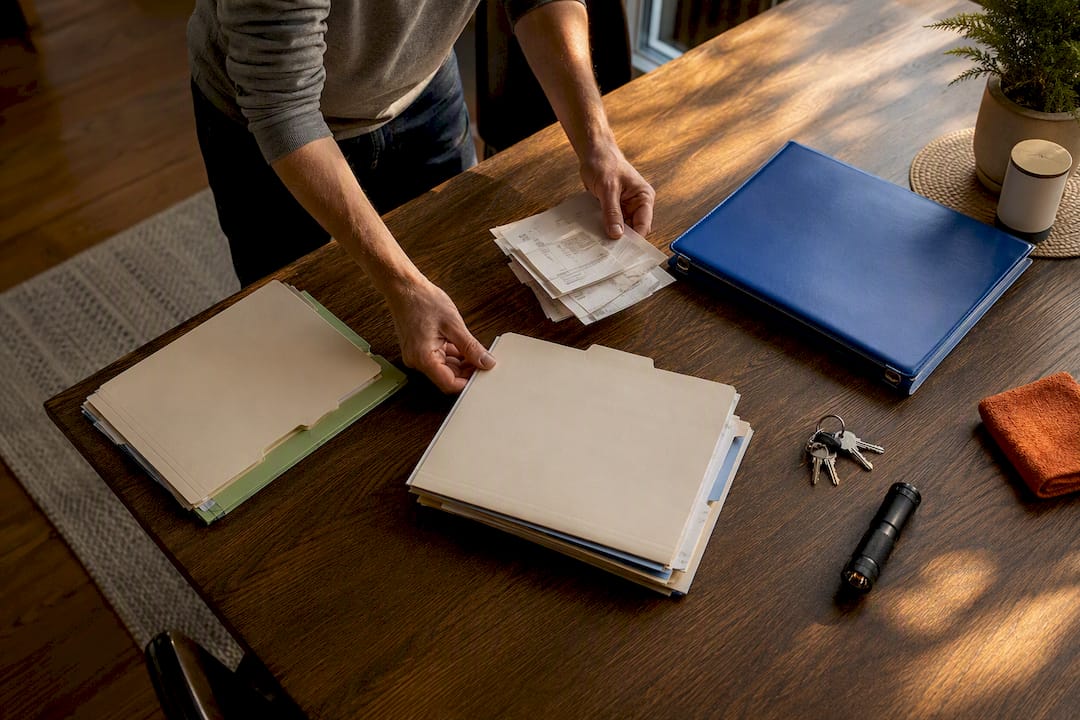
Organize home maintenance by system, not by date: create folders for HVAC, plumbing, electrical, roof, and appliances, then run everything off a recurring calendar. Start this weekend by gathering your last year of receipts, setting up those system folders, and adding three calendar reminders for your HVAC filter, water heater flush, and gutter cleaning. A tool like a home maintenance app can handle the reminders and storage automatically once the basics are in place.
TL;DR:
- Prioritize maintenance of water heaters, roofs, and HVAC systems, as neglecting them leads to the most costly repairs with minimal warning.
- Organize records by home system with consistent file naming, keeping documents accessible in digital, physical, or combined formats for at least seven years.
- Use a recurring calendar or maintenance app to set seasonal and long-term reminders, grouping tasks by season to maximize efficiency and reduce time spent.
- Capture new records immediately with photos or scans to maintain timely, accurate up-to-date information, avoiding backlog and lost documentation issues.
- When managing multiple properties or seeking automation, a dedicated home maintenance platform with auto-categorization and contractor access becomes increasingly valuable.
Table of Contents
- Quick-Start Checklist: Your First 90 Days
- How Do You Organize Home Maintenance Records?
- Build a Maintenance Calendar and Reminders That Actually Run Themselves
- Which Format Should You Use: Binder, Spreadsheet, or App?
- Sustaining the System: How to Keep Records Current Without It Becoming a Chore
- Why a Purpose-Built Platform Helps
- Don’t Forget Emergency Contacts and Insurance Records
- Author Perspective: What Actually Matters When You Start
- Get Started with Workbench Guide
- Sources
- FAQ
Quick-Start Checklist: Your First 90 Days
Most homeowners fail at this not because the system is complicated, but because they try to build the whole thing in one sitting. Break it into three phases instead.
- Days 1 to 30: Gather every receipt, warranty card, and inspection report you can find. Scan or photograph each one. Create your folder structure (digital, physical, or both) and log the make, model, and install date of every major system in the house.
- Days 31 to 60: Set recurring calendar reminders for anything on a fixed schedule. HVAC filters, smoke detector tests, and water heater checks all belong here.
- Days 61 to 90: Work through your first full seasonal cycle. Complete whatever tasks match the current season, and note what you missed so next quarter runs smoother.
Six systems cause the most expensive surprises when ignored, so prioritize them first:
- HVAC filter replacement and annual professional tune-up
- Water heater flushing and leak inspection
- Smoke and carbon monoxide detector testing
- Dryer vent cleaning (a leading cause of house fires when neglected)
- Gutter cleaning, especially before and after leaf season
- Roof inspection after major storms or every 12 to 18 months
Cap your monthly time investment at 30 to 45 minutes for routine tasks, and batch similar chores together. Testing every detector in the house on the same afternoon takes ten minutes. Spreading that across four separate weekends wastes far more time than the task itself. The NAHB’s routine maintenance checklist breaks these seasonal checks down room by room if you want a fuller reference while you build your own list.
How Do You Organize Home Maintenance Records?
Chronological filing, everything in one folder by date, feels natural but falls apart the moment you need to find “the last time we serviced the furnace.” System-based filing solves that. Every document lives inside a folder named for the home system it belongs to, with the date embedded in the file name rather than the folder structure.
A basic setup looks like this:
| System | Subfolder Contents |
|---|---|
| HVAC | Install invoice, filter specs, annual service reports, warranty |
| Plumbing | Water heater manual, leak repair invoices, main shutoff location notes |
| Electrical | Panel diagram, permit records, any rewiring invoices |
| Roofing | Inspection reports, storm damage photos, warranty documents |
| Appliances | Purchase receipts, model/serial numbers, extended warranty terms |
RealEstateLedger’s guide to organizing home maintenance records recommends capturing six specific data points every time a professional does work on your home: the date, the vendor’s contact information, the exact system or component serviced, the work performed, the cost, and the next service due date. Skip any of those six and you’ll eventually be stuck calling around trying to remember who fixed your water heater last year.
Name files consistently, something like 2026-03_HVAC_annualservice_SmithHeating.pdf, so you can scan a folder and know instantly what you’re looking at without opening every document. Keep a copy in the cloud and a second copy on a local drive or in a physical binder. A home maintenance binder with sections for indoor, outdoor, and emergency information still works well as a backup, particularly for anyone who wants something to hand a house sitter or a new owner.
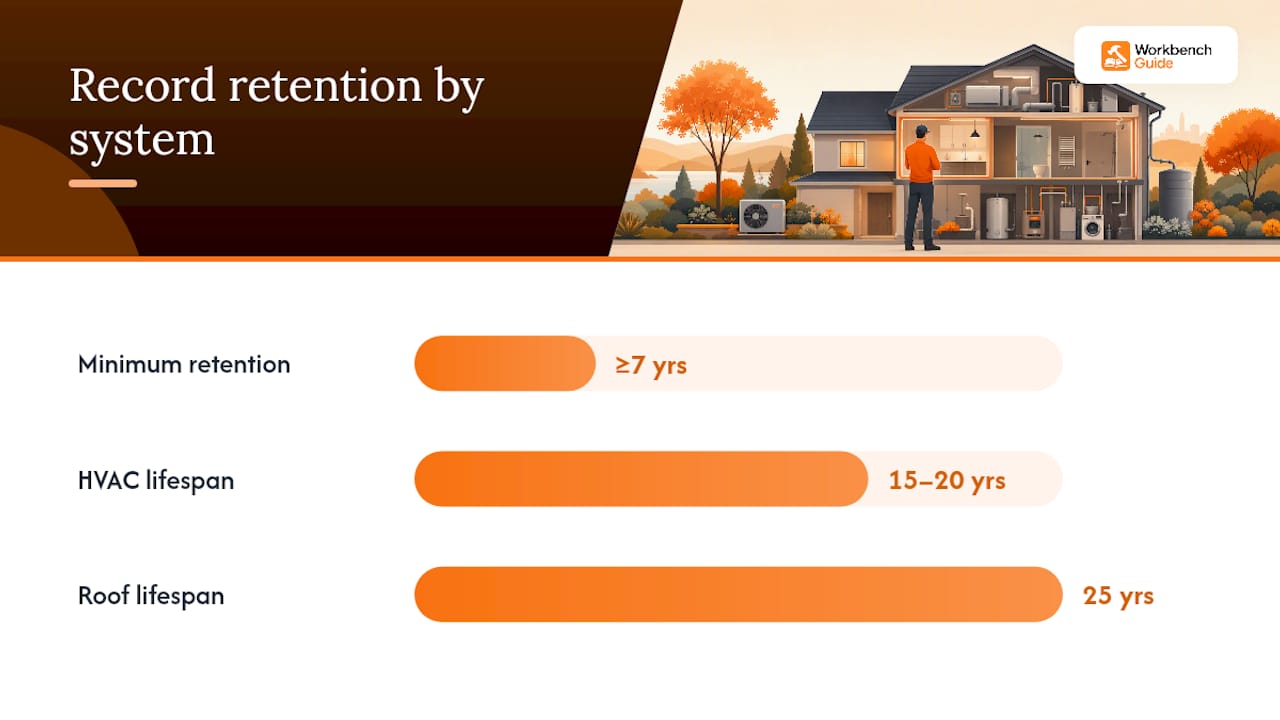
For retention, keep records for the useful life of the system or a minimum of seven years, whichever is longer. An HVAC system that lasts 15 to 20 years should have paperwork covering its entire lifespan; a roof rated for 25 years deserves the same treatment.
Build a Maintenance Calendar and Reminders That Actually Run Themselves
A folder full of records does nothing if you never look at it again. The calendar is what turns organize home maintenance from a one-weekend project into a system that survives year three.
Start with a task inventory. Walk through the houseroom by room, or system by system if that’s easier, and write down every recurring task along with a realistic frequency:
- Monthly: check fire extinguishers, test detectors, inspect visible plumbing under sinks
- Quarterly: clean HVAC filters, test garage door safety features, check water softener salt
- Annually: professional HVAC tune-up, gutter cleaning, water heater flush, roof inspection
- Every 3 to 5 years: exterior paint touch-up, chimney inspection, septic pumping
Once the inventory exists, decide where it lives. You don’t need a specialized tool to start. A shared family calendar with recurring events works fine for a single property with a handful of tasks. Once you’re managing multiple properties, tracking contractor history, or juggling more than a dozen recurring items, a dedicated maintenance app that categorizes tasks automatically saves real time over manually re-entering events every year.
Homemanagement notes that preventive maintenance costs roughly a third of what emergency repairs run for the identical problem. That gap alone justifies the twenty minutes it takes to set up recurring reminders.
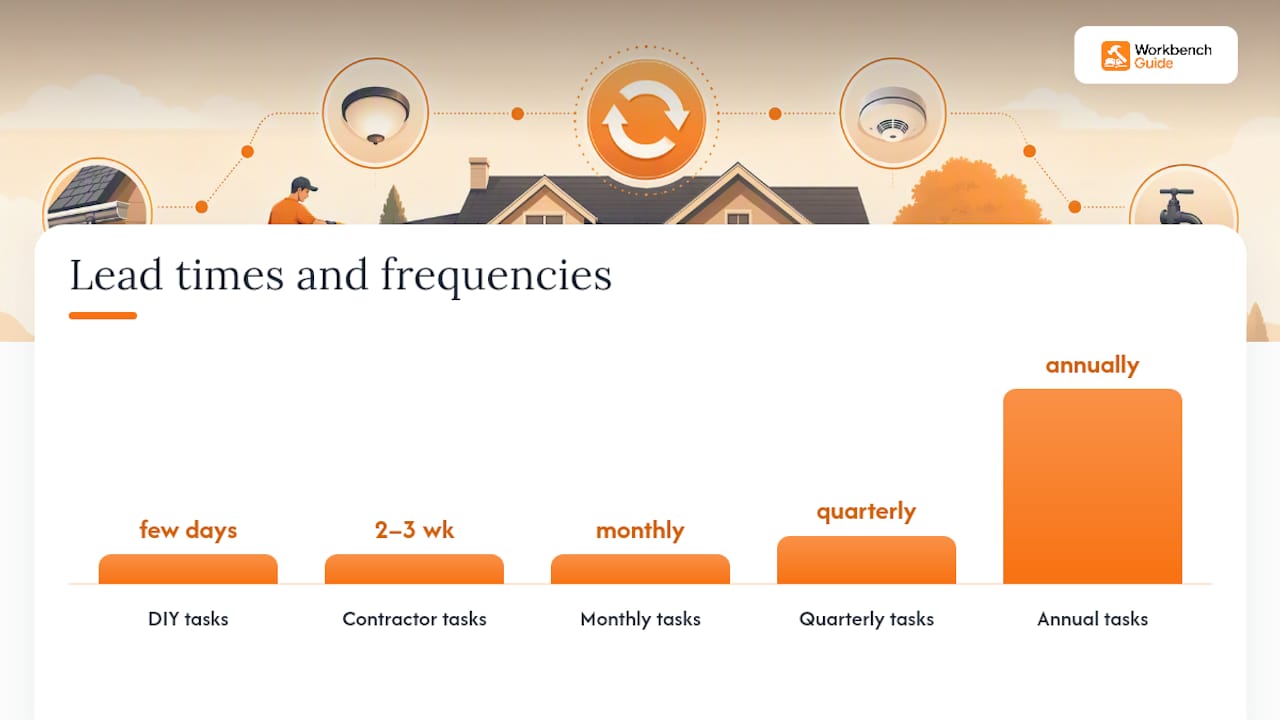
Set reminders with lead time that matches the task. Give yourself two to three weeks of warning for anything requiring a contractor, since good HVAC and roofing companies book out fast during peak seasons. DIY tasks can run on shorter notice, a few days is plenty. Group tasks by season rather than scattering them randomly through the calendar, following a smart seasonal cleaning checklist for efficient batching and timing. Spring cleanup, summer AC prep, fall gutter clearing, and winter pipe protection each cluster naturally, and batching them keeps you from feeling like you’re doing home maintenance every single weekend.
Which Format Should You Use: Binder, Spreadsheet, or App?
There’s no single right answer here, only the right answer for how involved you want to be.
A physical binder costs almost nothing and works even during a power outage, but you’re stuck manually copying information and it offers zero reminder capability. A spreadsheet with cloud backup adds searchability and lets you sort by system or due date, though you still have to remember to open it. A dedicated maintenance app handles reminders, photo storage, and contractor records automatically, which matters most once you’re managing more than one property or want contractor access built in.
Four templates are worth building immediately regardless of which format you pick:
- A maintenance log tracking every task, date completed, and next due date
- A service-capture form covering those six data points RealEstateLedger recommends
- A contractor contact list with company name, phone, and specialty
- An inventory sheet listing every major appliance with model and serial numbers
Pro Tip: Digitize as you go instead of batch-scanning a year of receipts at once. Snap a photo the moment a technician hands you an invoice, save it straight into the right system folder, and you’ll never face a shoebox of paper again.
If your spreadsheet has grown past 50 rows or you’re managing more than one property, that’s usually the signal to move to a dedicated platform. Workbench Guide’s maintenance checklist templates give you a structured starting point if you want to skip building one from scratch.
Sustaining the System: How to Keep Records Current Without It Becoming a Chore
The setup phase is the easy part. What separates a system that lasts from one that dies in month four is the capture habit, the tiny ritual that keeps new information flowing in.
- Capture immediately. The moment a receipt, warranty card, or inspection report crosses your path, photograph it and drop it in the right folder. This should take under two minutes; if it’s taking longer, your folder structure is too complicated.
- Review monthly. Spend 5 to 15 minutes checking what’s due and confirming last month’s tasks actually got logged.
- Review quarterly. Spend 15 to 30 minutes verifying nothing fell through the cracks and adjusting reminders that didn’t fit reality.
- Run an annual “home health day.” Block 30 to 120 minutes once a year to walk the full property, update every record, and check on warranty expiration dates.
The two-minute capture rule and a one-fix-per-month habit beat an elaborate system you set up once and abandon by summer. Good records also pay off beyond routine upkeep: insurance adjusters move faster on claims when you can produce dated service history, and buyers negotiate less aggressively when a seller hands over organized proof of a well-maintained roof, HVAC system, and water heater.
Why a Purpose-Built Platform Helps
A binder and a shared calendar cover the basics, but they still rely entirely on you remembering to update them. This is where a platform built specifically for home maintenance closes the gap.
Some home maintenance platforms assist homeowners by providing smart reminders that adjust based on home systems, step-by-step DIY guides for tasks you might handle yourself, and project checklists for inspections.
- Auto-categorization can sort scanned receipts into the right system folder without manual filing
- Multi-property tools may let landlords and property managers track multiple homes from one dashboard
- Contractor Q&A access can provide a place to ask a professional before deciding whether a job needs expert help
If your current setup is a mix of email confirmations, a paper folder, and a memory that’s starting to fail you, moving that information into a platform designed for it is a reasonable next step rather than a project overhaul.
Don’t Forget Emergency Contacts and Insurance Records
None of this organizing matters if you can’t find your homeowner’s insurance policy number at 2 a.m. during a burst pipe. Your system needs an emergency section separate from your routine maintenance folders, and it needs to be accessible without hunting through a filing cabinet.
Keep a single page, physical or digital, listing your plumber, electrician, HVAC technician, and a 24-hour emergency restoration company if you have one. Include your water main shutoff location, gas shutoff location, and electrical panel location, since these are the details people forget under stress. A home maintenance binder built with a dedicated emergency section makes this information findable by anyone in the house, not just whoever manages the spreadsheet.
Your insurance and warranty documentation deserves its own folder too, separate from routine service records. Store your homeowner’s policy number, agent contact, and a copy of the declarations page. Add warranty documents for major appliances and systems, noting the expiration date for each so you’re not discovering a warranty lapsed the week before you needed it.
This section matters more than people expect during a claim. Adjusters ask for proof of maintenance on systems tied to water damage or fire claims, and a folder with dated service records moves that conversation along far faster than trying to reconstruct history from memory. If you’re renovating soon, keep permit copies and contractor licenses here as well. A step-by-step renovation guide can help you track that paperwork as projects happen instead of scrambling afterward.
Author Perspective: What Actually Matters When You Start
If you only fix one category first, fix water, heat, and anything exposed to weather. Water heaters, roofs, and HVAC systems fail expensively and rarely give much warning. Electrical panels and appliances can usually wait a few more weeks on your list.
The homeowners who stick with this long term aren’t the ones with the most elaborate spreadsheet. They’re the ones who kept a basic system running for three years instead of building a perfect one that died by June. On hiring decisions, a simple rule works: if a mistake could involve gas, structural framing, or your main electrical panel, call a licensed professional. Everything else is worth attempting yourself first.
— Sean
Get Started with Workbench Guide
Everything covered above, system folders, a recurring calendar, six-point service capture, works with nothing more than a notebook and a shared calendar app. But manually re-entering reminders every year and hunting for last spring’s HVAC invoice gets old fast, especially once you’re tracking more than one property.
Some home maintenance apps map directly onto this system: they store your documents and photos by system automatically, send reminders before tasks come due instead of after missed deadlines, and offer contractor Q&A access when unsure about professional help. Templates and automation can be included without needing multiple apps for reminders and storage.
Start with the free home maintenance checklist to see how the system translates into a working template, or explore a trial to get your reminders running before your next season change.
Sources
- How to Organize Home Maintenance Records: 5 Steps
- How to Create a Home Maintenance Calendar That Practically Runs Itself
- Guide to Routine Home Maintenance
- You need a home maintenance binder and what to put in it
FAQ
What’s the most overlooked home maintenance task?
Dryer vent cleaning ranks among the most skipped tasks, despite being a leading cause of house fires, along with testing carbon monoxide detectors, which many homeowners assume are fine simply because the smoke detector alarm works.
What is the best checklist for home maintenance?
A seasonal checklist organized by system, covering HVAC, plumbing, roofing, and detectors, works best because it groups tasks by when they need attention rather than listing everything in one long undifferentiated block; the NAHB’s routine maintenance checklist is a solid starting reference.
What is a good free app for home maintenance?
Some home maintenance apps offer a free tier with maintenance checklists and reminder tools, letting homeowners try the system before committing to paid plans for multi-property tracking or contractor access.
What is a good home maintenance planner?
The strongest planners combine a recurring calendar for reminders with a system-based folder structure for records. A physical binder with digital backup covers the basics, while a dedicated app adds automated reminders on top.
Leave a Reply